![Highland_logo_1millionmiles_Brandmark_White-1.png]](https://24210048.hs-sites.com/hs-fs/hubfs/Highland_logo_1millionmiles_Brandmark_White-1.png?width=40&height=40&name=Highland_logo_1millionmiles_Brandmark_White-1.png)
Cold Weather
Ensure your buses are prepared for inclement weather, especially in temperatures below 30° to avoid turtle mode* and conserve battery life.
Winter pre-trip routine
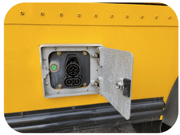
- Unplug the bus from the charger
- Turn the bus on completely, including cabin heaters
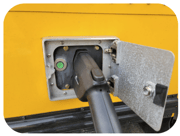
- Plug the bus back into the charger
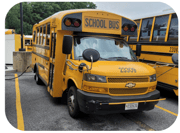
- Let the bus warm up for 10-15 minutes
- Unplug the charger and start the route
Maintaining battery range
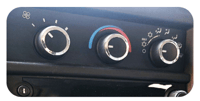
- Set the heat to a comfortable (70° is recommended) temperature at medium blast
- If heat is no longer required, turn the temperature and setting dials to the blue zone
- Keep windows closed to conserve heat
*Turtle mode: Drive power is restricted. Typical causes for this condition include the high-voltage batteries not being sufficiently charged or being at its operating temperature limit, such as in very cold outdoor temperatures.
To Increase the Range of the Bus
- Use the Regenerative Braking feature
This bus is equipped with regenerative brakes. Regenerative brakes cause the motor to act as a generator, converting kinetic energy from an object in motion to electrical energy that recharges the high voltage battery. The generating process creates resistance against the rotating wheels which, in turn, helps slow the vehicle
Drivers may notice slight differences in the amount of pressure on the brake pedal that is required to slow or stop the vehicle. The vehicle may also slow down faster while the vehicle is coasting, this is normal - Turn the temperature and setting dials to the blue zone if you are not using the heating system, leaving the knob in the red zone will reduce the range
Tips for Driving on the Road
- Accelerate and slow down in a smooth, moderate fashion
- Drive at steady speeds
- Anticipate stops; slowing down may eliminate the need to stop
- Keep the tires properly inflated and use only the recommended size
- Perform all regularly scheduled maintenance
- Avoid sudden or hard accelerations since this can reduce the battery range of the bus
Charging Tips
To charge, park the bus in a safe location and conduct the following:
- Remove the charging handle from the charging station
- Visually inspect the cord and handle for signs of damage. DO NOT use the charger if the cord or handle is cut, damaged or broken. If these faults are present, please follow your company’s issue reporting procedures
- Open the charging door on the vehicle’s charging port
- Make sure to fully insert the charger handle into the charge port. You'll hear a clicking sound once it's properly inserted
- A locking motor sound indicates the charger is engaged properly

- Check the message center on the bus dashboard. The green battery symbol should be illuminated
To end a charging session conduct the following:
- Push the unlock button on the charger handle; remove the handle from the charging port
- Press the center right edge of the charge port door to close
- You can also unlock the handle through the vehicle touchscreen. If the handle still does not unlock, please follow your issue reporting procedure
Do not attempt to remove the charge handle before it is unlocked. Do not use any kind of tool to try and remove a locked charge handle. Doing so can lead to damage to your vehicle and the charge handle. Your vehicle will not shift out of park (P) until the handle is removed.
Preserving the high voltage battery
Maintain the battery SoC between 20% and 90% for Optimal EV battery life. If your vehicle reaches a 20% state of charge, recharge your vehicle as soon as possible.
⇑
For additional details on Optimal buses, please refer to the Optimal High Voltage Safety Training 101 & Operator's Guide