![Highland_logo_1millionmiles_Brandmark_White-1.png]](https://24210048.hs-sites.com/hs-fs/hubfs/Highland_logo_1millionmiles_Brandmark_White-1.png?width=40&height=40&name=Highland_logo_1millionmiles_Brandmark_White-1.png)
Start a Charging Session
- Verify that the bus parking brake is on and the key is in the OFF position
- Check the charging cord to make sure it is not damaged or wet
- Open the charge port door on the bus and make sure the area is clean and free of dirt and debris
- Remove the handle from the holster on the charger
- Firmly insert the connector into the EV charging port, you will hear a “click’ when connected properly
- Vehicle/Charger as well as cable check will initiate
- Once the cable was checked successfully the charging session will start. SoC & energy transfer will be displayed on the charger screen
- Before walking away, ensure the bus is charging by checking for both the charger and bus charging indicators
End a Charging Session
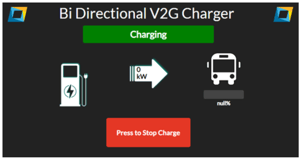
- Press the red "Stop Charge" button on the display screen, wait 15 seconds and disconnect the handle from the charging port on the bus once you hear the port unlock. When the cable is disconnected the indicator light will turn off
- When the vehicle reaches the maximum SoC the charging session will end automatically and the screen will display the "Please unplug and return connector to the dispenser holder" message
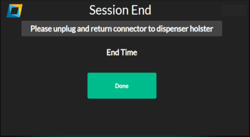
- When the vehicle reaches the maximum SoC the charging session will end automatically and the screen will display the "Please unplug and return connector to the dispenser holder" message
- Return the charger handle to the holster on the charger
- Coil up the cord to prevent accidental damage Never leave the charging handle out in the open or on the ground
- Coil up the cord to prevent accidental damage Never leave the charging handle out in the open or on the ground
Emergency Stop
The dispenser includes two Emergency Power Off (EPO or E-Stop) switches wired in series with the remote PCS
- External “Mushroom” Button: Located on the left side of the dispenser when looking at the front display screen. Twist the button to allow the button to pop out and reset
- Service Door Interlock Switch: Located just inside the dispenser’s service access door on the upper right-hand side. Close the service access door to reset the switch
The PCS will initiate a shut down and open contactors when either of these switches is either opened or pressed
ONLY use in the event of a true emergency. Do NOT engage if you have a simple charger connection issue.
Additional Indicators

If your charger is not working as intended, follow your company’s issue reporting procedures. Be sure to tell them the time, date, and charger ID with which the error occurred.
For additional details on Borg Warner chargers, please refer to the Borg Warner User Manual