![Highland_logo_1millionmiles_Brandmark_White-1.png]](https://24210048.hs-sites.com/hs-fs/hubfs/Highland_logo_1millionmiles_Brandmark_White-1.png?width=40&height=40&name=Highland_logo_1millionmiles_Brandmark_White-1.png)
- Cold Weather
- To Increase Range of the Bus
- Why is my Bus Losing Power?
- Why Won’t the Bus Move After Stopping?
- Tips for Bus not Starting
- Tips for Driving on the Road
- Charging Tips
Cold Weather
Ensure your buses are prepared for inclement weather, especially in temperatures below 30° to avoid turtle mode* and conserve battery life.
Winter pre-trip routine
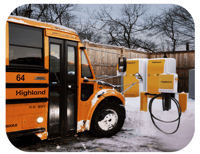
- Unplug the bus from the charger
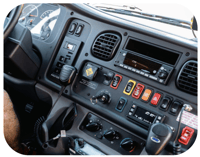
- Turn the bus on completely, including cabin heaters
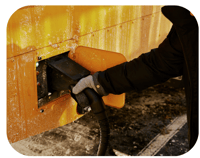
- Plug the bus back into the charger

- Let the bus warm up for 10-15 minutes

- Unplug the charger and start the route
Maintaining battery range
- Use driver's heated seat
- Set the heat to a comfortable (70° is recommended) temperature at medium
blast - If heat is no longer required, turn the temperature and setting dials to the blue zone
- Keep windows closed to conserve heat
*Turtle mode: Drive power is restricted. Typical causes for this condition include the high-voltage batteries not being sufficiently charged or being at its operating temperature limit, such as in very cold outdoor temperatures.
To Increase the Range of the Bus
Regenerative braking
Use the regenerative braking feature (L mode on the shifter) for smoother braking and increased range
-
- Smooth Driving = More Range (STAR from driver training)
Start slowly and gradually increase speed
Transition smoothly between acceleration and deceleration
Anticipate the need to slow down early
Regular constant speed should be used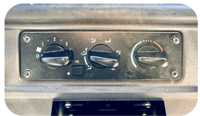
- Smooth Driving = More Range (STAR from driver training)
- Turn the temperature and setting dials to the blue zone if you are not using the heating system, leaving the knob in the red zone will reduce the range. Leaving the knob in the red zone will reduce range
- Turn HVAC system off (heating or cooling) if you are going to be idle for along period of time and it is safe to do so
Why is my Bus Losing Power?
State of Charge Schedule
As the SoC of the bus begins to decrease, you’ll observe the following:
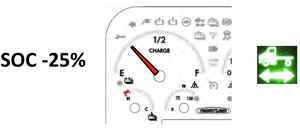
- Cruise Control disables
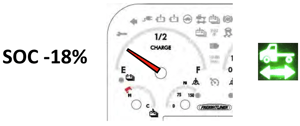
- Driver HVAC compartment is at 20% cooling
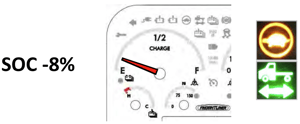
- Traction Motor De-Rate 32% available
- Driver HVAC compartment is at 20%
- Passenger HVAC compartment at 20%
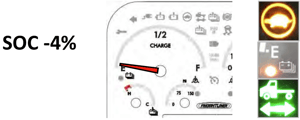
- Significant Traction Motor De-Rate (16% available)
- Fuel gauge indicator
- Driver HVAC compartment at 20%
- Passenger HVAC compartment disabled
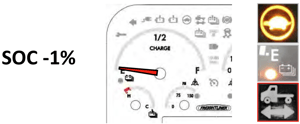
- Fuel Gauge indicator
- Driver HVAC compartment disabled
- Passenger HVAC compartment disabled
- HV System / Traction Motor disabled
A HV battery warning fault or a HV battery critical fault can result in a significant traction motor De-Rate.

Why Won’t the Bus Move After Stopping?
Rollaway assist:
As a safety feature to prevent rollaway, Rollaway Assist will automatically engage the parking brake when ALL THREE of these conditions are met:
- Your foot is off the service brake and accelerator pedal
- The vehicle is in Drive or ‘L’ mode
- The vehicle is stationary for 30 seconds or more
Rollaway Assist will not engage if the driver touches the service brake or accelerator pedal before 30 seconds.
To disengage Rollaway Assist:
If your bus won’t move or go into gear while driving, try the following:
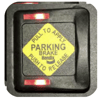
- Push and hold the service brake down; AND while holding the service brake, pull out and then push in the parking brake switch
- Select a drive mode (Drive, L, or Reverse)
Tips for Bus not Starting
If the bus will not start, do the following:
If the 12V master switch is OFF:
- Turn on the 12V battery from the 12V battery compartment
- If the vehicle does not turn on, please follow your companies issue reporting procedures
If the 12V master switch is ON:
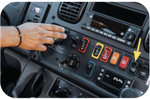
- Turn the 12V master off from the 12V battery compartment for 30 seconds
- Turn the 12V master back on and try again
If the dash powers up as expected:
- Turn and hold the key to the right to fully power up the vehicle
If the dash does not power up as expected:
- Follow your companies issue reporting procedures
If the dash warning indicators are on:
- Turn the bus off, wait 30 seconds, turn the bus back on as you would before you drive
If the warnings persist, try the full system reset:
- Turn the vehicle off
- Turn OFF the 12V master switch and wait 30 seconds
- Turn ON the 12V master switch
- Turn the bus back on
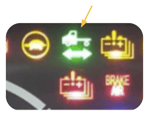
- Look for the Green Vehicle with an arrow symbol on the dash
Tips for Driving on the Road
If the bus SoC suddenly drops:
- If the vehicle is still operating, finish the route safely (if there is adequate SoC)
- Follow your companies issue reporting procedures
If the bus will not accelerate once stopped
As a safety feature to prevent rollaway, Rollaway Assist will automatically engage the parking brake when ALL THREE of these conditions are met:
- Your foot is off the service brake and accelerator pedal
- The vehicle is in Drive or ‘L’ mode
- The vehicle is stationary for 30 seconds or more
Rollaway Assist will not engage if the driver touches the service brake or accelerator pedal before 30 seconds.
To disengage Rollaway Assist
If your bus won’t move or go into gear while driving, try the following:
- Push and hold the service brake down; AND while holding the service brake, pull out and then push in the parking brake switch
- Select a drive mode (Drive, L, or Reverse
If there is a shift “lag” between gears while driving at 30-40 MPH:
This is completely normal! The bus’s transmission is shifting into ‘High Speed” around 30-40mph
Charging Tips
To charge, park the bus in a safe charging location and conduct the following:
- Before charging the bus make sure the bus is in Park Mode
- Set the parking brake by pulling up on the yellow control switch
- Turn the Ignition Switch to the OFF position to turn off the bus
- Insert the handle connector firmly into the port, until you hear it "click" when fully seated
- The charging process will begin after a short (5 to 10 second) delay. The connector will lock into the port with an audible “click” and the green light above the charge port will begin a slow flash during the charging process. A solid green light indicates that the charge process is complete
Why isn’t the bus charging when the charger is plugged in?
- Check if the red light above the charge port is on and then check the charger display for errors
- If the emergency stop button on the charger is pressed in, disengage it and confirm the charger is ready to initiate the charging session
- Unplug the bus, wait 30 seconds, then plug it in again
- If the issue remains, please follow your companies issue reporting procedures
For additional details on Thomas Jouley buses, please refer to the Jouley - 101 High Voltage Safety & Operators Guide.