![Highland_logo_1millionmiles_Brandmark_White-1.png]](https://24210048.hs-sites.com/hs-fs/hubfs/Highland_logo_1millionmiles_Brandmark_White-1.png?width=40&height=40&name=Highland_logo_1millionmiles_Brandmark_White-1.png)
Cold Weather
Ensure your buses are prepared for inclement weather, especially in temperatures below 30° to avoid turtle mode* and conserve battery life.
If a vehicle has been parked for an extended period in cold weather, always check to be sure all wheels are rolling free (brakes are not frozen) when starting out. Always clean accumulated ice and snow from brake linkage
Winter Pre-Trip Routine
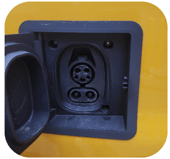
- Unplug the bus from the charger

- Turn the bus on completely, including cabin heaters
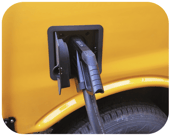
- Plug the bus back into the charger
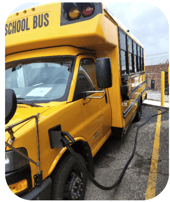
- Let the bus warm up for 10-15 minutes
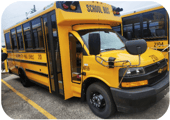
- Unplug the charger and start the route
*Turtle mode: Drive power is restricted. Typical causes for this condition include the high-voltage batteries not being sufficiently charged or being at its operating temperature limit, such as in very cold outdoor temperatures.
Maintaining Battery Range
- Set the heat to a comfortable (70° is recommended) temperature at medium blast
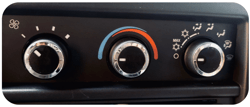
- If heat is no longer required, turn the temperature and setting dials to the blue zone
- Keep windows closed to conserve heat
⇑
Tips to Increase Range
To increase the range of the bus:
- Maximize one-pedal driving
- Use regenerative braking (“re-gen”) to slow down. This puts energy back into the batteries
- Use the brakes as needed for rapid deceleration and for holding the bus still
- Avoid rapid acceleration
- Turn off the cabin heater or AC if not needed. Cabin heaters and air conditioning draw their power from the batteries. Reducing their use will improve the bus’s range
- If expecting extreme hot or cold weather, park your bus in a garage if possible or leave it plugged in on the charger
- Preconditioning in this way means you’ll see optimal performance and efficiency from the moment you start your journey
Hill Start Assist (HSA)
The HSA feature prevents unintentional vehicle motion while transferring from the brake pedal to the accelerator.
- This feature should not be used to hold the vehicle, as the assist will release after about 2 seconds and may not always engage depending on conditions
- When the HSA feature is active, additional accelerator input may be necessary to overcome the incline and accelerate the vehicle
- It is always recommended to allow additional space between your vehicle and surrounding vehicles
Do not rely on the Hill Start Assist feature. HSA does not replace the need to pay attention and drive safely. You may not hear or feel alerts or warnings provided by this system. Failure to use proper care when driving may result in injury, death, or vehicle damage.
Tips for Driving on the Road
Acceleration
To accelerate the vehicle, press the accelerator pedal. In this way, the electric vehicle acts the same as a conventional vehicle. When you release the accelerator pedal when traveling over 5 mph, the vehicle slows rapidly as the electric motor provides regenerative braking. To keep the vehicle from regenerative braking, press lightly on the accelerator pedal.
Speed limitation
The bus has a limited top speed of 65mph
- This feature is intended to improve battery efficiency and vehicle safety
- The vehicle may occasionally exceed the top speed limit when traveling downhill
- The limited speed may be reduced further if the batteries or the motor overheat
- These conditions will be designated by malfunction indicator lamps (MIL) on the dash
- It is advisable to ensure that brakes don’t overheat on extended downhill drives by periodically allowing them to cool
Brakes and regenerative braking
To slow the vehicle do the following:
- Press the brake pedal and modulate pressure to change braking rate
- To coast and engage regenerative braking, simply lift your foot from the accelerator pedal while the vehicle is moving forward
Brake lights illuminate either when the driver presses the brake pedal or the regenerative braking system decelerates the vehicle at a significant rate.
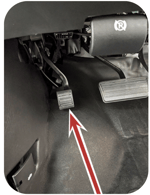
Regenerative braking does NOT increase by pressing the stock brake pedal. Engaging the stock brakes allows you to slow the vehicle quicker but may reduce regenerative braking.
Use regenerative braking for efficiency, but don't rely solely on it for safety. In emergencies or to avoid collisions, use the brake pedal. Failure to do so could lead to injury, death, or property damage.
Charging Tips
To charge, park the bus in a safe location and conduct the following:
- Place the Transmission/Drive Selector into P (PARK)
- Apply the parking brake and turn the ignition to OFF
- Wait 45-60 seconds as this allows the systems to fully shut down
- Follow the instructions on the dispenser to begin the charging process
- If the charging session does not begin, unplug the charger, wait 60 seconds, then try plugging-in again
- Monitor the charging icon on the buses digital dashboard to ensure that the charger is properly connected and has begun charging
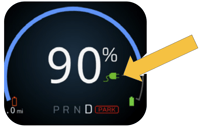
- When you connect the charger to the bus, you will hear a series of clicks as the charger locks into place. When the charger is properly connected, the charging icon (in the bus dashboard) illuminates and displays the charge percentage
- When finished charging, end charging session by pressing the STOP button on the charging station. This will disengage the locking connector that prevents you from removing the charger during an active charge session
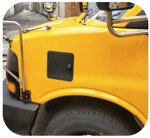
- Remove the charger from the charge port and snap the charge port lid in place
Why isn’t the bus charging when the charger is plugged in?
- If the charging icon does not illuminate when the charger is connected to the charge port, disconnect the charger for 45-60 seconds and then reconnect
- If the charging icon still does not illuminate, repeat the 45-60 seconds disconnect a total of three times if necessary
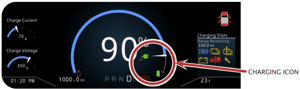
If the charging icon does not illuminate after three 45-60 seconds disconnects, follow your companies issue reporting procedures
For additional details on Lightning buses, please refer to the Lightning Supplementary Owner's manual