![Highland_logo_1millionmiles_Brandmark_White-1.png]](https://24210048.hs-sites.com/hs-fs/hubfs/Highland_logo_1millionmiles_Brandmark_White-1.png?width=40&height=40&name=Highland_logo_1millionmiles_Brandmark_White-1.png)
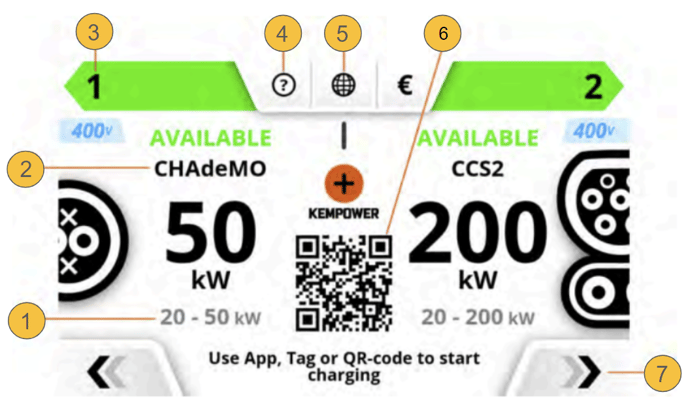
- Power range: available power range for the vehicle connector
- Vehicle connector type: CCS2 or CHAdeMO
- Vehicle connector number identifier
- Help: press for more information
- Language: press to select another user interface language
- QR code: scan to access charging session information via your mobile device
- Change view: press for more information about the charging session
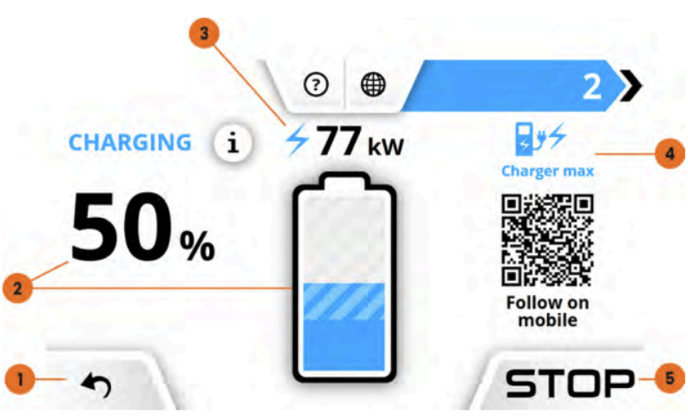
- Change view: press to return to the previous view
- State of Charge (SoC): press the battery icon for the charging curve.
- Charging power: shows the current charging rate for the active charging session
- Charging rate limit: shows what is limiting the charging rate, for example the charging unit, the vehicle or the network
- Stop: press to end the charging session
For additional details on Kempowers chargers, please refer to the Kempower Charging Equipement Owners Manual