![Highland_logo_1millionmiles_Brandmark_White-1.png]](https://24210048.hs-sites.com/hs-fs/hubfs/Highland_logo_1millionmiles_Brandmark_White-1.png?width=40&height=40&name=Highland_logo_1millionmiles_Brandmark_White-1.png)
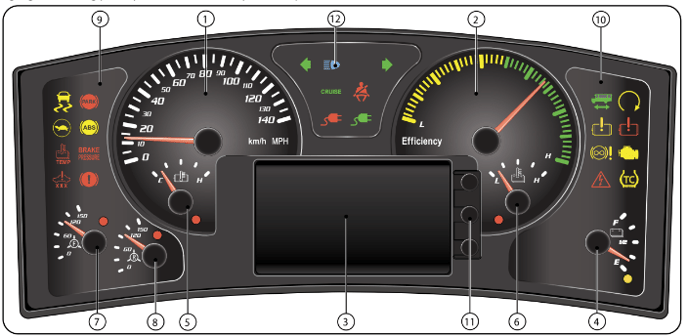
| 1. Speedometer: Indicates vehicle speed in miles/hour or kilometers/hour | 7. Front air gauge: Indicates air pressure in the front brake system and includes a low air warning indicator. The low air indicator will flash rapidly when pressure is ≤65 PSI and goes out when pressure is ≥72 PSI |
| 2. Efficiency gauge: Indicates the degree of power usage. Yellow zone reflects inefficient power usage and the Green zone indicates efficient power usage | 8. Rear air gauge: Indicates air pressure in rear brake system and includes a low air warning indicator. The low air indicator will flash rapidly when pressure is ≤65 PSI and goes out when pressure is ≥72 PSI |
| 3. Message display center: Displays additional information to the vehicle operator. If bus is equipped with a back-up camera, it can also serve as the monitor when the bus is shifted into Reverse | 9. Left warning bank: Cluster of indicator lamps. See Warning Bank Indicators |
| 4. State of charge: The State of Charge (SOC) gauge indicates the charge level of the propulsion batteries. A low charge indicator will flash rapidly and display a message when the signal is missing or out of range | 10. Right warning bank: Cluster of indicator lamps. See Warning Bank Indicators |
| 5. Motor temperature gauge: Indicates the temperature of the main drive motor. A high temperature indicator light will flash rapidly and display a message when the data is missing or out of range | 11. Message display center control Panel: Navigation buttons are used to toggle through the menus and to select items to display in the Message Display Center |
| 6. Battery temperature gauge: Indicates the temperature of the propulsion batteries. A high battery temperature indicator will flash rapidly and a message will be displayed for missing or out of range data | 12. Headlight highbeam indicator: This indicator will illuminate when highbeam headlights are turned on |
Some warning lights are accompanied by an audible alarm and or a message that is displayed in the LCD Message Display Screen. All warnings, with associated alarms/display messages, can be acknowledged.
If the user acknowledges the warning by pressing any of the three buttons, the display will go back to the previous screen and the alarm will stop, but the indicator lamp will remain active. The alarm/display will reoccur if fault still exists at the next ignition or in a predetermined time frame.
The following is a list of warning bank lights and a description for each indicator
 |
Left turn. Flashes with left turn signal |
 |
Wait to start. Indicates electric bus is preparing the system for use. Do NOT attempt to enable bus until this light is off |

|
Park. Indicates parking brake is applied |
 |
Electronic stability control (Optional). Indicates stability control is activated |

|
ABS. Indicates fault in the Anti-lock Brakes System |
 |
Cruise. Cruise control has been activated |

|
High beam. Headlights are in high beam |
 |
Right turn. Flashes with right turn signal. |

|
Seat belt. Indicates driver seatbelt not engaged |
 |
Malfunction indicator lamp (MIL). Indicates a system component failure |

|
Brake alarm. Indicates problem with the service brakes (Metric Units only) |
 |
Regenerative braking disabled. Indicates regenerative braking system is not on |

|
Bus enabled. Indicates bus is ready for operation |
 |
High voltage warning. Indicates an issue with the voltage system |

|
Limited performance mode. Indicates performance will be limited due to low charge |
  |
Battery charger status (RED and GREEN). Indicates status of connection when charging batteries |

|
Propulsion disabled. Indicates motor no longer providing power to move bus |
  |
Electric motor warning (AMBER and RED). Indicates an issue with the electric motor |
For additional details on Blue Bird buses, please refer to the Blue Bird Drivers Handbook